

Navigating Your Self-Assessment Tax Return: UK Pensions & State Benefits Edition
Self-Assessment tax returns can feel daunting, but understanding how to handle UK pensions and state benefits makes the process significantly smoother. This guide will walk you through the key steps involved in completing your return, specifically focusing on these often-confusing income streams.
Who Needs to File a Self-Assessment Tax Return?
You generally need to file a Self-Assessment tax return if you:
- Are self-employed.
- Receive income from property.
- Have untaxed income, such as dividends exceeding the dividend allowance.
- Earn more than £100,000 per year.
- Receive income from a pension that hasn’t been taxed at source or where the tax deducted isn’t sufficient.
- Receive certain state benefits, like Employment and Support Allowance (ESA), Jobseeker’s Allowance (JSA), or Carer’s Allowance, which may be taxable in some circumstances.
Getting Started:
-
Register for Self-Assessment (if you haven’t already): Visit the HMRC website and follow the instructions. You’ll receive a Unique Taxpayer Reference (UTR) which is essential for filing your return.
-
Gather Your Documents: This is crucial! You’ll need the following:
- P60: From your employer, showing your total income and tax paid (if you’re employed in addition to having pension or benefit income).
- P45: If you’ve recently left a job.
- P60 (Pension): From each of your pension providers, detailing the gross pension received and any tax deducted. This will typically be called a “Statement of Taxable Income” or similar.
- Statements from HMRC: Detailing any state benefits you’ve received, such as ESA, JSA, or Carer’s Allowance. These are usually sent out towards the end of the tax year. If you haven’t received them, contact HMRC directly.
- Details of any other income: Such as bank interest, dividends, or rental income.
- Details of any allowable expenses: Relevant to your specific circumstances (e.g., if you’re self-employed).
-
Choose How to File: You have two main options:
- Online via the HMRC website: This is the most common method. You’ll need your Government Gateway user ID and password.
- By post: This is possible, but the deadline is earlier (October 31st). You’ll need to download the appropriate forms from the HMRC website. We recommend online submission for its ease and convenience.
Completing the Self-Assessment Form: Pensions & State Benefits Focus
We’ll be focusing on the areas of the online form most relevant to pensions and state benefits. Remember that the exact layout might change slightly each year.
Section: Employment (if applicable)
- If you’re employed in addition to receiving a pension, you’ll need to enter your employment income and tax details from your P60 and P45. This section is largely unrelated to your pension or benefits, but crucial if you hold a job.
Section: Pensions
This is where you’ll enter details of all your pension income.
-
State Pension: You generally don’t need to report the State Pension specifically. HMRC usually has this information already.
-
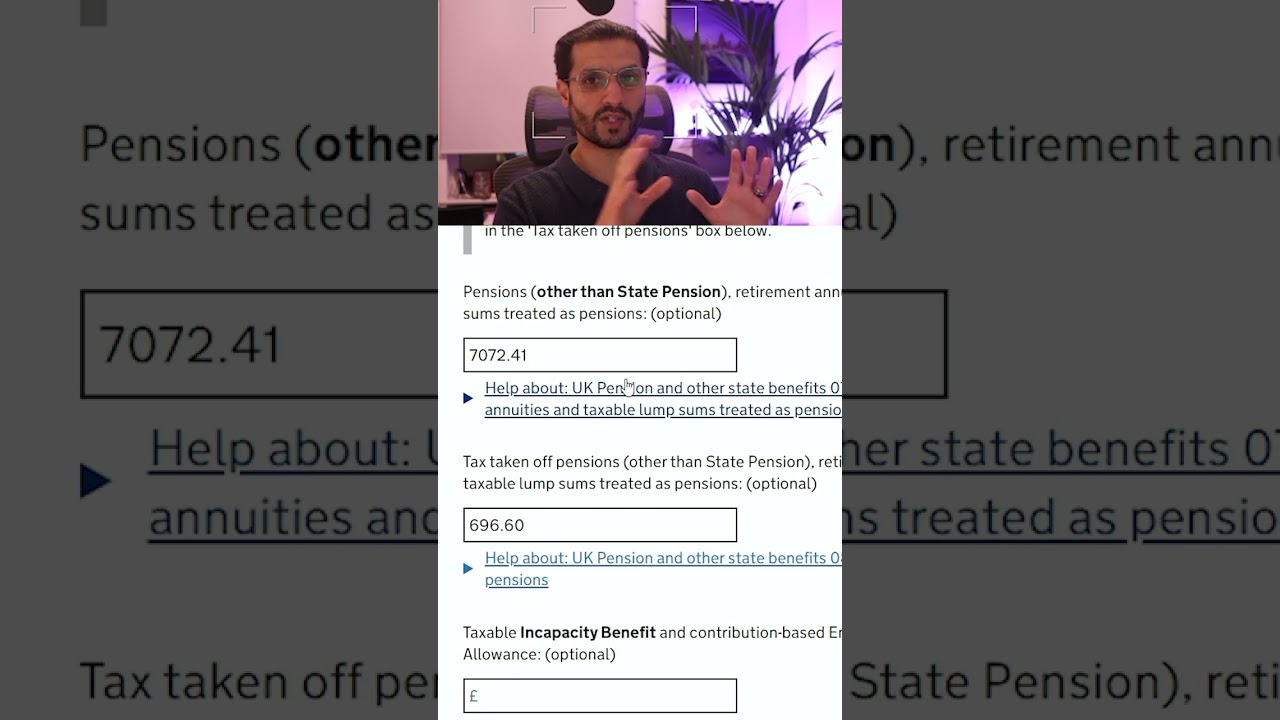
Occupational Pensions & Personal Pensions:
- Box 4: Enter the gross amount of each pension you received (before any tax was deducted). This information is found on your P60 (Pension).
- Box 5: Enter the total amount of tax deducted from each pension. Also found on your P60 (Pension).
-
Annuities: If you receive income from an annuity, report it in the “Annuity payments” section. Follow the instructions on the form, entering the gross amount and tax deducted.
Section: Benefits
This section deals with taxable state benefits. It is crucial to know which benefits are taxable and which aren’t.
-
Taxable Benefits: Some benefits are taxable if your total income exceeds a certain threshold. These might include:
- Contribution-based Employment and Support Allowance (ESA): This is often taxable.
- Jobseeker’s Allowance (JSA): Sometimes taxable.
-
Non-Taxable Benefits: Generally, the following are not taxable:
- State Pension: As mentioned above.
- Disability Living Allowance (DLA) / Personal Independence Payment (PIP).
- Child Benefit.
- Universal Credit.
-
Filling in the Benefits Section:
- Look for a specific section dedicated to benefits. The name may vary slightly.
- Enter the gross amount of any taxable benefits you received during the tax year. The statements from HMRC will tell you the total amount received.
- If no tax has been deducted, enter “0” in the tax deducted box.
- Important: If you are unsure whether a benefit is taxable, contact HMRC directly or consult with a tax advisor.
Section: Savings and Investments (if applicable)
- Interest from Savings: If you earn more than your Personal Savings Allowance (£1,000 for basic rate taxpayers, £500 for higher rate taxpayers, and £0 for additional rate taxpayers), you’ll need to declare any interest earned on savings accounts.
- Dividends: If you receive dividends from shares exceeding the dividend allowance (£500 for the 2024/2025 tax year), you’ll need to declare them in the “Dividends from UK companies” section.
Final Steps:
- Review Everything Carefully: Before submitting, double-check all the information you’ve entered. Errors can lead to penalties.
- Declare any other income: Ensure you have correctly declared all other income streams such as income from property and dividends exceeding allowances.
- Calculate Your Tax Liability: The online system will automatically calculate your tax liability based on the information you’ve provided.
- Submit Your Return: Once you’re satisfied everything is correct, submit your return online.
- Pay Your Tax: The deadline for online submission and payment is usually January 31st following the end of the tax year (April 5th). Pay your tax liability on time to avoid penalties.
Important Tips and Considerations:
- Keep Accurate Records: Maintain all relevant documents for at least 22 months after the end of the tax year in case HMRC asks for further information.
- Claim Allowable Expenses: If you’re self-employed, or have other applicable circumstances, you can deduct certain allowable expenses to reduce your tax liability. Research what you can claim.
- Seek Professional Advice: If you’re unsure about any aspect of your self-assessment tax return, particularly if you have complex income streams or circumstances, consider seeking advice from a qualified accountant or tax advisor. They can provide tailored guidance and ensure you’re compliant with tax laws.
- HMRC Helpline: The HMRC helpline is a valuable resource. Don’t hesitate to contact them if you have any questions. Be prepared for potential wait times.
- Deadlines: Be mindful of the deadlines for submission and payment. Late filing or payment can result in penalties.
Completing a Self-Assessment tax return can be manageable with careful preparation and attention to detail. By understanding how to report your UK pensions and state benefits correctly, you can ensure your return is accurate and avoid potential issues with HMRC. Remember to seek professional help if you are uncertain about any aspect of the process. Good luck!
LEARN MORE ABOUT: Retirement Pension Plans
REVEALED: Best Investment During Inflation
HOW TO INVEST IN GOLD: Gold IRA Investing
HOW TO INVEST IN SILVER: Silver IRA Investing




Where do i fill in the pension but its not state pension its a private other one