
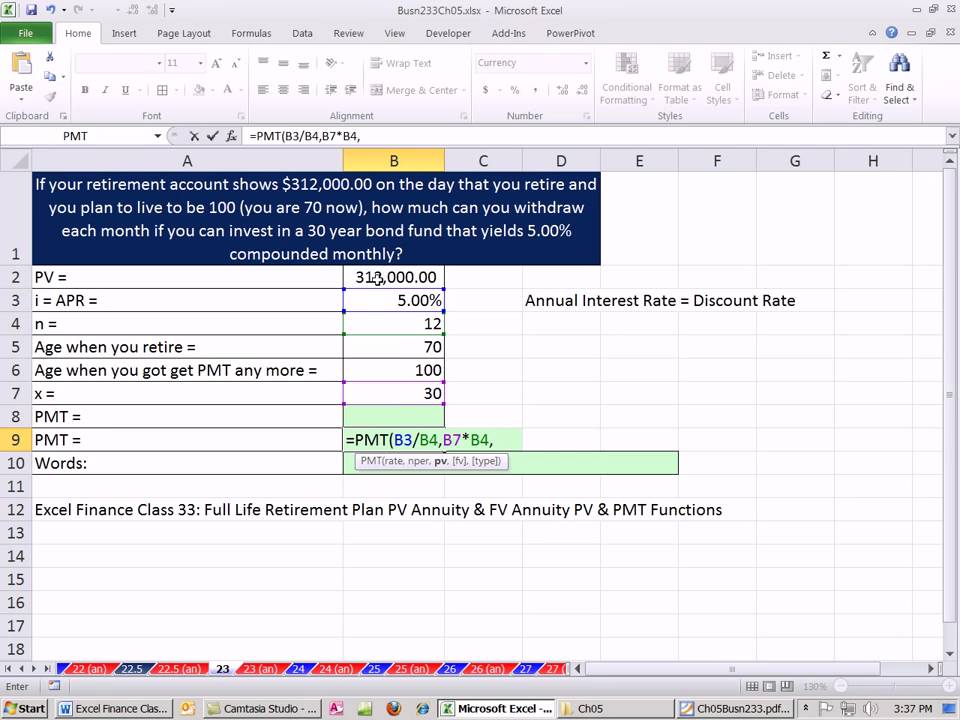

ACCTG 455: Excel Finance Class 37 – How Much Do I Get Each Month During Retirement?
Welcome to ACCTG 455: Excel Finance, where we deepen our understanding of financial principles through the powerful tool of Excel. In Class 37, we tackle a daunting yet vital question for many: "How Much Do I Get Each Month During Retirement?" This topic not only brings peace of mind to future retirees but also emphasizes various financial strategies that can enhance one’s retirement plan.
Understanding Retirement Income
When planning for retirement, understanding your potential monthly income is crucial. Different sources may contribute to your retirement income, including:
- Social Security Benefits: A key component for many, these benefits serve as a safety net to cover living expenses.
- Pension Plans: If you’ve worked for an employer who offers a pension plan, this could provide a defined benefit during retirement.
- Personal Savings and Investments: Several retirees rely on their savings, IRAs, and 401(k)s. Understanding how to draw from these sources efficiently can significantly influence your monthly cash flow.
- Annuities: Purchasing an annuity can provide a steady income stream in exchange for a lump sum payment during retirement.
The Essential Formula
To figure out how much you can withdraw monthly from your retirement savings, we often use the Four Percent Rule—a guideline suggesting that retirees can withdraw 4% of their initial retirement assets with adjustments for inflation, which should ideally last for 30 years. However, this is a starting point; actual withdrawals depend on various personal financial factors.
To calculate your monthly withdrawal amount accurately using Excel, you can utilize the PMT function, which helps determine the annuity payment required to pay out a specific amount over time.
The PMT Function:
The syntax for the PMT function in Excel is as follows:
=PMT(rate, nper, pv, [fv], [type])Where:
- rate: Interest rate for each period (monthly).
- nper: Total number of payment periods (years until depletion).
- pv: Present value or the total retirement savings.
- fv: Future value, usually 0 for retirement calculations.
- type: When the payment is due; 0 denotes the end of the period, and 1 denotes the beginning.
Example Calculation
Let’s say you wish to retire with $1,000,000, expect an average annual return of 5%, want your retirement to last 30 years, and want to compute your monthly withdrawals. Here’s a simplified breakdown using the PMT function:
-
Convert the annual return to a monthly return:
- 5% per year = 0.41667% per month (5%/12)
-
Total number of payments over 30 years:
- 30 years * 12 months = 360 payments.
- Using the PMT function in Excel:
=PMT(0.0041667, 360, -1000000)Note: The present value is negative because it represents an outgoing payment.
By executing this formula in Excel, you can derive the approximation of your monthly withdrawal, which allows you to assess whether your savings can sustain your lifestyle during retirement.
Considerations Beyond Basic Calculations
While Excel calculations provide a solid foundation for understanding withdrawal rates, retirees should consider:
-
Inflation: Over time, inflation can erode purchasing power, necessitating adjustments in withdrawals.
-
Market Conditions: Different years can yield different returns, and market volatility can affect your portfolio’s health.
-
Longevity: As life expectancies increase, the risk of outliving retirement savings has become a more pressing concern.
-
Healthcare Costs: Health-related expenses can significantly impact financial planning. It is prudent to account for unexpected medical needs.
- Tax Implications: Understanding how taxes affect withdrawals from retirement accounts is crucial for effective planning.
Conclusion
ACCTG 455: Excel Finance Class 37 provides invaluable insights into retirement financial planning. By effectively utilizing Excel and understanding key retirement income sources, future retirees can answer a critical question: “How much do I get each month during retirement?” Establishing a proactive strategy today will help ensure financial stability and peace of mind in the golden years ahead. Retirees armed with these tools not only enhance their financial literacy but also empower themselves to make informed decisions for a sustainable and fulfilling retirement.
LEARN MORE ABOUT: Retirement Annuities
REVEALED: How To Invest During Inflation
HOW TO INVEST IN GOLD: Gold IRA Investing
HOW TO INVEST IN SILVER: Silver IRA Investing


Thank you sir, for these fun exercises
Thanks !
Why 312000 is pv not fv ?